Reach out to us!



Reach out to us!

Say goodbye to manual push notifications. Let LaraPush handle the heavy lifting for you.
Automate your push notification strategy with intelligent content selection. Send random posts from your recent content at your desired frequency without manual intervention.
Set custom frequencies using flexible cron scheduling
Automatically pick from recent posts or use static content
Monitor engagement and optimize your automation strategy
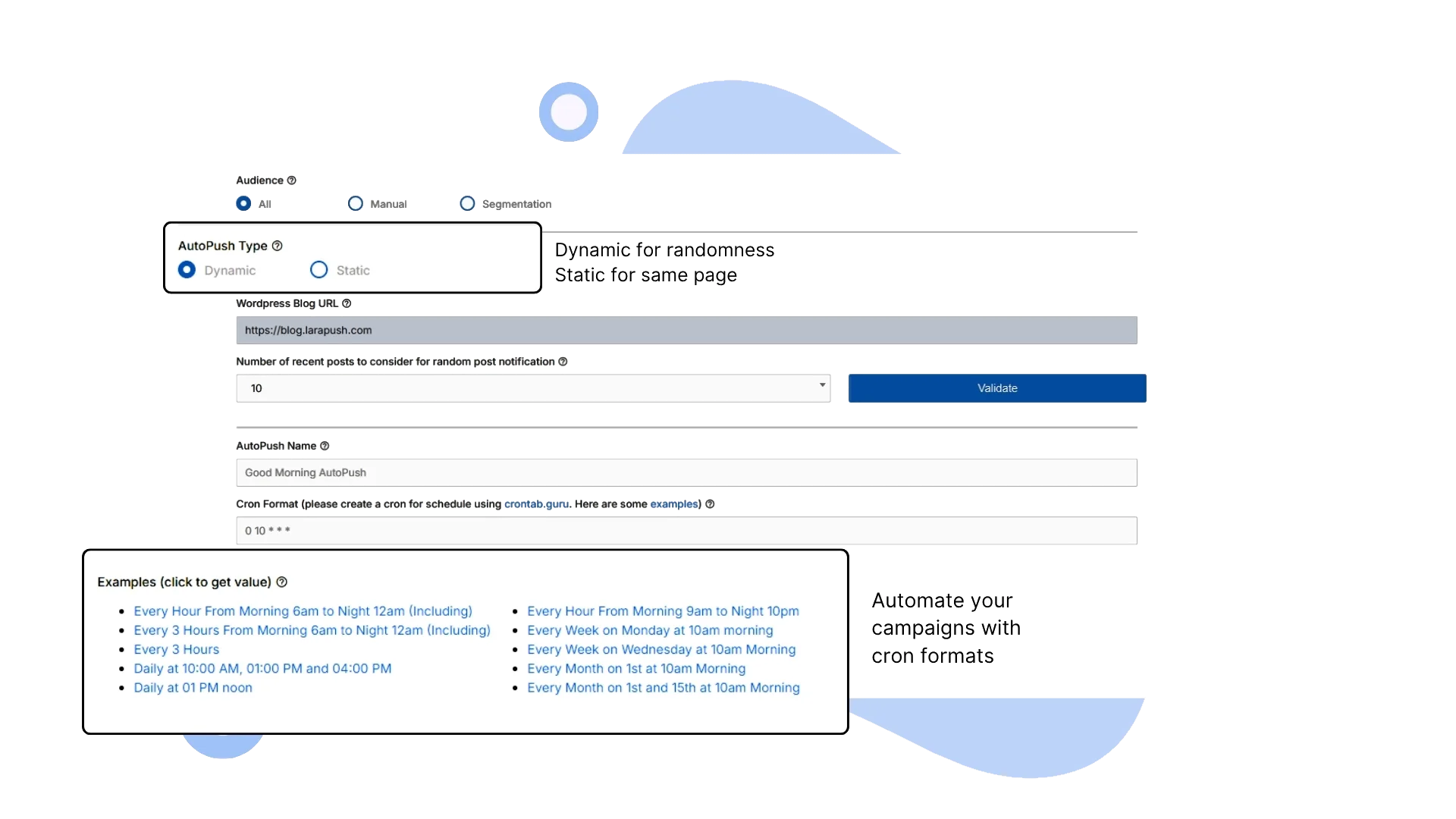
Powerful automation features that intelligently manage your push campaigns while you focus on creating great content.
Automatically pick random posts from your recent WordPress content. Set look-back ranges so every notification feels fresh.
Create evergreen push campaigns with fixed imagery, copy, and CTAs that send on autopilot.
Cron-based scheduling gives you daily, weekly, or fully custom frequency control.
Send to everyone, hand-picked subscribers, or smart segments for precise delivery.
Set-and-forget automation that runs 24/7, keeping subscribers engaged without manual effort.
Track delivery rates, engagement metrics, and ROI to optimize AutoMagic over time.
Discover how different industries leverage AutoMagic Push automation to maintain consistent audience engagement and drive results.
Keep readers engaged with automated notifications from your latest articles, ensuring consistent traffic throughout the day.
Automatically promote new product reviews, buying guides, and seasonal content to drive consistent sales.
Curate and share the best content from your archives automatically, keeping audiences engaged with quality posts.
Send automated reminders for upcoming events, workshops, and webinars using both dynamic and static content.
Set up intelligent automation that manages your push campaigns while you focus on creating exceptional content.
Pick Dynamic or Static mode, define your audience, and plug in your WordPress content source.
Use flexible cron schedules for daily, weekly, or custom cadences and preview the send plan.
AutoMagic runs continuously, pulling fresh content and delivering notifications at the perfect moment.
Review analytics, delivery rates, and engagement metrics to refine campaigns over time.
Get answers to common questions about setting up and managing your automated push notification campaigns.
Dynamic AutoMagic automatically selects random posts from your recent content using WordPress API integration, while Static AutoMagic sends pre-designed notifications with custom titles, descriptions, and images. Dynamic is great for blogs with regular content, while Static is perfect for announcements and promotions.
For Dynamic AutoMagic, you provide the URL where your latest posts appear. Our system validates the WordPress API connection and can access your recent posts. You set a range number (e.g., last 10 posts) from which the automation randomly selects content to share.
AutoMagic offers three targeting options: 'All' subscribers (default), 'Manual' selection where you choose specific subscribers, and 'Segment' targeting based on audience segments you've created. This ensures your content reaches the right people.
If the WordPress API becomes unavailable, Dynamic AutoMagic campaigns will pause automatically to prevent sending broken notifications. You'll receive alerts about the issue, and the system will resume once your site is back online.
Absolutely! The AutoMagic setup includes a preview section where you can see exactly how your notifications will appear to subscribers. This allows you to review content, formatting, and appearance before saving your campaign.
AutoMagic provides comprehensive analytics including delivery rates, click-through rates, engagement metrics, and conversion tracking. You can monitor campaign performance in real-time and make data-driven optimizations.
Yes, you can create and run multiple AutoMagic campaigns with different schedules, content sources, and target audiences. This allows you to segment your strategy and test different approaches for optimal engagement.
See how LaraPush’s features work together for even greater engagement and impact.
Join thousands of websites using LaraPush to deliver the right notifications to the right audience at the right time. Get started in minutes.

LaraPush is a self hosted push notification service. The USP of our brand is we provide a life time deal and you don’t have to pay for it again.
©LaraPush 2026. All rights reserved