Reach out to us!



Reach out to us!

Group your users. Send the right notification, at the right time.
Boost engagement and reduce unsubscribes by sending highly personalized push notifications to specific user segments based on behavior, location, device, and more.
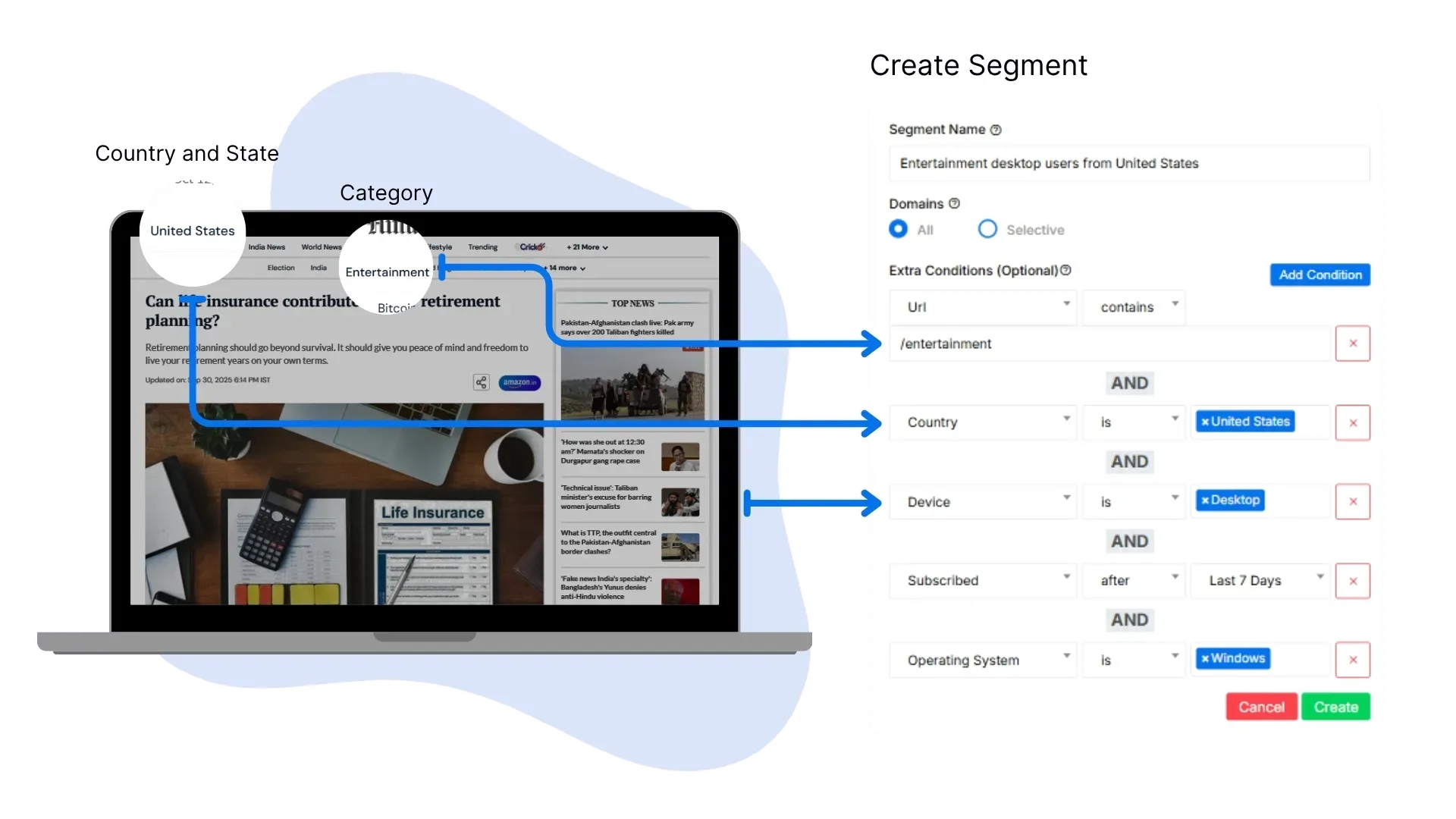
Segmentation allows you to divide your audience into specific groups based on shared characteristics, enabling you to send highly targeted and relevant push notifications.
Deliver notifications that resonate with each user group's specific interests and behavior patterns.
Increase click-through rates by up to 95% with targeted messages that matter to your users.
Minimize unsubscribes and spam reports by sending relevant content to interested users only.
Keep users engaged longer with notifications that add value to their experience.
Create precise audience segments using multiple criteria. Mix and match to build the perfect target audience for your campaigns.
Target users based on the specific pages they visit.
Example: Users who subscribed from /entertainment page
Segment your audience by country, state, or region.
Example: Users from California, USA
Distinguish between mobile, desktop, or tablet users.
Example: Mobile users only
Target users based on their operating system.
Example: Windows, Android, or iOS
Segment subscribers by the browser they use.
Example: Chrome browser users
Build segments based on when subscribers joined.
Example: Subscribed in the last 30 days
Follow these simple steps to create your first audience segment and start sending more targeted notifications.
Open the LaraPush dashboard and click on “Audience Segments”.
Click “New Segment” and give it a descriptive name.
Pick filters such as URL, location, device, OS, browser, or subscription date.
Add multiple AND/OR conditions to refine your target audience.
View the estimated number of users matching your criteria before sending.
Save the segment and apply it to campaigns or automation workflows.
See exactly how many users match your criteria before sending.
Optimize targeting before each campaign. Adjust filters in real-time and avoid over or under-targeting your subscribers.
Adjust the filters to refine your segment size before launching a campaign.
See how businesses like yours are using audience segmentation to drive better results and improve user experience.
Target students searching for JEE, CBSE, and board exam results with timely notifications.
85% increase in result notification engagement
Notify citizens about relevant state schemes like Ladli Yojana or Subhadra Yojana based on location.
4x higher clicks vs standard campaigns
Re-engage inactive users with special offers and timely updates.
45% user reactivation success
A few reasons teams trust LaraPush to drive meaningful engagement.
Manage every site and brand from one central workspace with shared segments.
Set up segments with drag-and-drop logic and preview the impact instantly.
Segments refresh automatically as users meet or leave filter conditions—no manual sync.
Deliver hyper-relevant messages that lift CTRs and reduce unsubscribes.
Everything you need to know about audience segmentation in LaraPush.
Yes. Every saved segment appears in the campaign composer, automation flows, and manual broadcasts, so you can target the same audience without rebuilding filters.
LaraPush shows the live subscriber count as you adjust filters. If it reaches zero, simply loosen the criteria—change the URL, widen geography, or extend the subscription date window until a suitable audience appears.
Segments update in real time. As soon as a subscriber matches (or no longer matches) a condition, the segment count reflects the change without any manual refresh or re-sync.
Absolutely. Chain unlimited filters—URL, location, device, OS, browser, subscription date, and custom user attributes—using AND/OR logic to craft hyper-personalized groups.
No limits. Create as many reusable segments as you need for different brands, funnels, or lifecycle stages—each segment is stored safely inside your self-hosted dashboard.
See how LaraPush’s features work together for even greater engagement and impact.
Join thousands of websites using LaraPush to deliver the right notifications to the right audience at the right time. Get started in minutes.

LaraPush is a self hosted push notification service. The USP of our brand is we provide a life time deal and you don’t have to pay for it again.
©LaraPush 2026. All rights reserved